
 uwu
0ba49d1cc0
README: plain step by step install guide
uwu
0ba49d1cc0
README: plain step by step install guide
|
vor 2 Monaten | |
|---|---|---|
| docs | vor 2 Monaten | |
| patches | vor 2 Monaten | |
| .gitignore | vor 2 Monaten | |
| LICENSE | vor 2 Monaten | |
| README.md | vor 2 Monaten | |
| install.sh | vor 2 Monaten | |
| launcher.sh | vor 2 Monaten | |
| uninstall.sh | vor 2 Monaten |
README.md
Embarrassed Shina-chan: Linux / Proton fix pack
Makes Embarrassed Shina-chan~ the Naked Wandering College Girl (Steam AppID
2326780, built with RPG Developer Bakin) run on Linux under Proton. Out of
the box the game reaches a grey/white screen and then freezes. Even once it
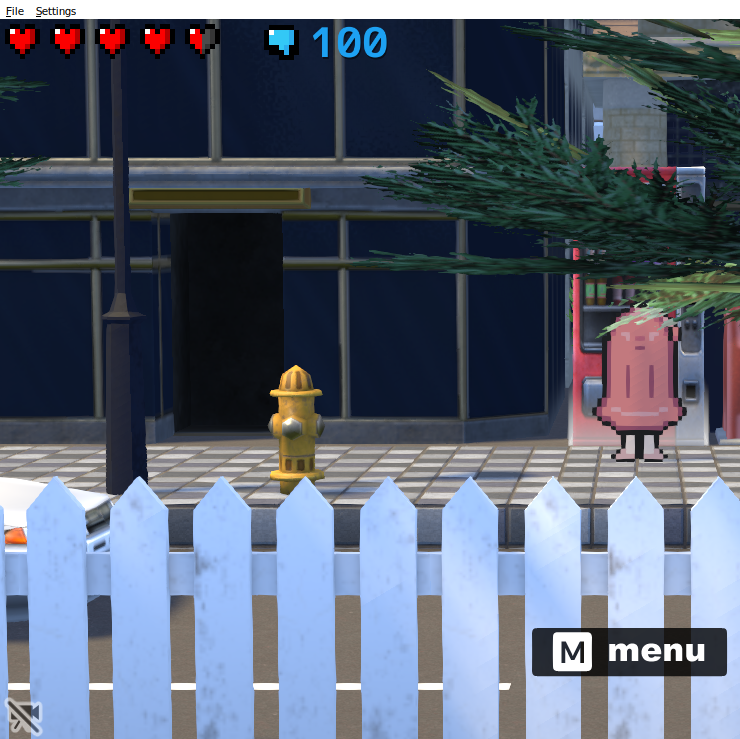
boots, the character sprites and all 2D menus are invisible. This pack applies
a set of small, documented, reversible fixes to your own copy so the game
boots, loads the full 3D map, and renders the characters, menus and UI.
The bugs are in this older Bakin engine build (kmyCore.dll ~5.4 MB, v1.1.0).
Newer Bakin games run on the same Proton with no changes at all, since the
engine fixed these issues upstream. This pack backports that behaviour into
the older build.
What it does not do
It ships no game files: no kmyCore.dll, no bakinplayer.exe, no shaders. It
only carries scripts and source that transform your installed copy, and it
verifies the original bytes and hashes before touching anything. Every change
is backed up and can be reverted with uninstall.sh.
Requirements
- A Linux Steam install of the game, run through Proton (tested on Proton Experimental / 11).
gcc,patch,python3,od/dd(standard on any desktop Linux).- The .NET SDK (
dotnet), only to build the ~30-line IL patcher for fix 2. The first build fetches Mono.Cecil from NuGet, so it needs network access once.
Install
Step by step. Everything is copy-paste, no Linux knowledge needed beyond opening a terminal.
Step 1. Make sure the game uses Proton.
In Steam: right click the game > Properties > Compatibility > tick "Force the use of a specific Steam Play compatibility tool" and pick Proton Experimental.
Step 2. Get this repo.
Open a terminal and run:
git clone https://github.com/WallpaperEngineLover/embarrassed-shina-linux-proton.git ~/shina-linux-patch
No git? On the repo page press the green "Code" button, "Download ZIP", unzip
it into your home folder and rename the folder to shina-linux-patch. The
folder must sit at a path with no spaces and no : in it. LD_PRELOAD breaks
on such paths, so the installer checks and refuses them.
Step 3. Install the tools the installer needs.
You need gcc, patch, python3 and the .NET SDK. Pick your distro:
# Ubuntu / Mint / Pop
sudo apt install gcc patch python3 dotnet-sdk-8.0

# Fedora / Nobara
sudo dnf install gcc patch python3 dotnet-sdk-9.0

# Arch / CachyOS / EndeavourOS
sudo pacman -S gcc patch python3 dotnet-sdk
Step 4. Run the installer.
cd ~/shina-linux-patch
bash install.sh
It finds the game on its own. If it can't, it says so, and you run it again with the game folder spelled out:
bash install.sh "/path/to/steamapps/common/Embarrassed Shina-chan~ the Naked Wandering College Girl"
Step 5. Set the Steam launch options.
The installer's final output prints a path ending in launcher.installed.sh.
In Steam: right click the game > Properties > General > Launch Options, and
paste that line, for example:
"/home/you/shina-linux-patch/launcher.installed.sh" %command%
Keep the quotes and the %command% exactly as printed.
Step 6. Play.
Start the game from Steam as usual. For most people the install ends here.
Step 7. Only if the keyboard does nothing in game (Wayland desktops).
Close the game fully, then:
cd ~/shina-linux-patch
bash patches/05-wayland-keyboard.sh "/path/to/steamapps/common/Embarrassed Shina-chan~ the Naked Wandering College Girl"
and start the game again. On X11 this step is never needed.
Undo everything:
cd ~/shina-linux-patch
bash uninstall.sh "/path/to/steamapps/common/Embarrassed Shina-chan~ the Naked Wandering College Girl"
then clear the Launch Options in Steam.
The fixes
| # | Symptom | Root cause | What the fix does | Layer |
|---|---|---|---|---|
| 1 | Grey screen, no models | scanPlugin reads the in-memory data.rbpack FS, which contains no .dlp asset loaders |
1-byte retarget of one call so it uses the on-disk FS creator |
kmyCore.dll (native) |
| 2 | (same) no .dlp found |
Entry.initialize("", null) makes the native path derivation fail under Wine |
IL rewrite: pass AppDomain.CurrentDomain.BaseDirectory instead of null |
bakinplayer.exe (managed) |
| 3 | White screen, "Vertex Attribute Problem", freeze | Mesa cross-stage DCE marks vin_* vertex inputs inactive, so glGetAttribLocation returns -1 |
keep-alive term in the shader that references every input, scaled by a uniform Mesa can't fold to 0 | game GLSL (text) |
| 4a | Characters, menus and all 2D UI invisible | The engine sets up 2D-sprite/UI vertex attributes on the default VAO (0). Legal in an OpenGL compatibility profile, but Wine gives it a core profile where glVertexAttribPointer then fails with GL_INVALID_OPERATION and the driver rejects every default-VAO draw |
LD_PRELOAD binds a real VAO whenever the game would use VAO 0 |
host GL (preload) |
| 4b | Freeze right after the map loads | WASAPI init fails (SndError 923); a thread waits forever on an "audio ready" event |
LD_PRELOAD caps INFINITE NtWaitForSingleObject at 10 s |
Wine/ntdll (preload) |
| 5 | Mouse works, keyboard doesn't (Wayland) | Window uses ICCCM "Globally Active" input model; compositor withholds keyboard focus | Wine registry UseTakeFocus=N (passive model) |
Wine registry |
Fixes 4a and 4b, plus the IBL BRDF LUT lighting texture, live in one small
LD_PRELOAD hook:
patches/04-runtime-hook/bakin_minimal.c.
Fix 4a is the one that makes the characters and menus appear.
Full technical write-up: docs/TECHNICAL.md.
How to review it
Everything is source or plain text:
- Fix 1,
patches/01-kmycore-diskfs.sh: verifies the full 5-bytecallinstruction (e8 58 92 fd ff) plus a hash check, then changes one byte (0x58to0xB8). - Fix 2,
patches/02-pluginpath/Program.cs: the Mono.Cecil IL rewrite, ~30 lines. - Fix 3,
patches/03-shader-vin-keepalive.patch: a unified diff of the shader include. - Fixes 4a/4b,
patches/04-runtime-hook/bakin_minimal.c: the VAO fix isensure_vao()plus theglVertexAttribPointer/glEnableVertexAttribArray/glBindVertexArraywrappers; the audio fix is theNtWaitForSingleObjectsplice; plus the IBL LUT drop. - Fix 5,
patches/05-wayland-keyboard.sh: a single registry value.
How the VAO bug was found
Every observable GL state on the character's draw was identical to the visible
3D models: same program, framebuffer, thread, depth/blend/stencil/cull,
viewport, even the attached textures. Still, nothing rendered. The break was
found by calling glGetError immediately after the character's draw (it
returned GL_INVALID_OPERATION) and then installing a
glDebugMessageCallback, which reported the exact reason:
glVertexAttribPointer(no array object bound). When a draw is invisible
despite matching a visible one in every state you can read, the draw itself
may be getting rejected; check glGetError on that draw and turn on GL debug
output.
Known limitations
A few street props (bus, Traffic light, Swing_ch1, ParkClock_ch1, ...)
log a non-fatal "Vertex Attribute Problem" during map load and may show wrong
or missing texture mapping. The game runs at full speed and everything else,
including characters and UI, renders fine.
Applying this to other Bakin games
Some of these fixes carry over to other games built on the same old Bakin engine
(the OpenGL build, kmyCore.dll around 5.4 MB). Others are tied to this one
game's files.
Newer Bakin games don't need any of this. They ship kmyDX12.dll and render with
DirectX 12 through vkd3d, which avoids the OpenGL bugs. The game 貢げ!女神様, on a
newer build, runs on Proton with no patches at all.
What carries over unchanged:
- The VAO fix, which is the main one. It's a plain LD_PRELOAD hook that binds a real VAO whenever the game uses the default VAO 0, and it never references this game. Load it into any old-Bakin OpenGL game under Wine or Proton and it should bring back the invisible characters, menus and UI. Any old OpenGL Windows game that assumes the default VAO in a Compatibility profile hits the same bug and takes the same fix.
- The audio wait cap and the Wayland
UseTakeFocusregistry value. Both act on Wine, not on the game.
What's tied to this build:
- Fix 1 (the one-byte
kmyCore.dlledit) and Fix 2 (thebakinplayer.exeIL rewrite) are pinned to onekmyCore.dll(md568590231...). The same build patches the same way, a different version has different offsets. The scripts check the exact bytes and stop if they don't match, so running them on the wrong build does nothing bad. It just refuses. - Fix 3 (the shader keep-alive) only applies if the game ships the same
v2_vpcommon.cgh. - The audio hook's
ntdlloffset (0x5b530) follows the Proton build, not the game.
To try it on another old-Bakin game:
- Start with the hook by itself (VAO fix and audio cap). Change the hardcoded
APPID=2326780ininstall.shto the new game's ID so@TMPBASE@resolves to its prefix, then set the launcher as that game's launch options. This is usually enough to get the characters and menus back. - If the game also opens to a grey, empty scene, you also need fixes 1 and 2,
with their offsets re-derived from that game's
kmyCore.dll. - Fix 3 is only worth doing if the log fills with "Vertex Attribute Problem".
None of this is guaranteed on a build nobody has tested, but the VAO fix is general enough to be the first thing to reach for.
Legal
This exists for interoperability: making a legally purchased game run on
Linux. No copyrighted game content is redistributed; the tools operate on your
own files. The bundled ibl_brdf_lut.bmp is a standard precomputed BRDF
lookup table (the Karis split-sum function), not game content.
bakin_minimal.c and the scripts are MIT-licensed (see LICENSE). "RPG
Developer Bakin" and the game are trademarks of their respective owners.